LLM Full Documentation View
This page programmatically includes all other documentation pages. It is intended for tools and LLMs that want a single-page view of the entire documentation while keeping each source file as the single source of truth.
NOTE: This page is built using the
include-markdownplugin. Each section below inlines the contents of an existing documentation file using Jinja-style directives.
Top-level







Py-Cachify is a lightweight, backend-agnostic Python library for caching, distributed locking, and resource pool management. Works seamlessly with both sync and async code.
Out of the box, it supports in-memory, Redis, and DragonflyDB backends. You can also integrate any custom backend by implementing the SyncClient or AsyncClient protocols.
Source Code: https://github.com/EzyGang/py-cachify
Why py-cachify?
There are many caching libraries for Python—so why choose py-cachify?
🪶 Tiny & Focused — No bloated dependencies or complex setup. Just install and use.
🔌 Backend Agnostic — Switch from in-memory (development) to Redis/DragonflyDB (production) by changing one line. Or plug in any custom backend that implements simple protocols.
✨ Minimal, Intuitive Syntax — Stop wrestling with low-level get/set calls. One decorator handles caching, locking, or pool management automatically.
🎯 Decorators That Just Work — No manual key management, no cache client wiring in every file. Initialize once, decorate everywhere. Both sync and async functions are supported with identical APIs.
🏭 Production Ready — 100% test coverage, used in commercial projects, fully type-annotated for excellent IDE support.
| Feature | What it solves |
|---|---|
| @cached | Eliminate redundant expensive computations and I/O |
| lock / @lock | Prevent race conditions in distributed systems |
| @once | Ensure background tasks don't overlap (deduplication) |
| pool / @pooled | Control concurrency—rate limiting, connection limits (v3.1.0) |
| Backend Agnostic | Switch between in-memory (dev) and Redis (prod) with one line |
| Sync + Async | Same API for both sync and async code |
Installation
pip
uv
poetry
For Redis support, you'll also need:
Table of Contents
- Quick Start
- Core Features
- Caching
- Distributed Locks
- Run Once
- Resource Pools (New in 3.1.0)
- Advanced Patterns
- Backend Configuration
- API Quick Reference
- Contributing
- License
Quick Start
from py_cachify import init_cachify, cached

# Initialize once (uses in-memory cache by default)
init_cachify()

@cached(key='user-{user_id}', ttl=300)
async def get_user(user_id: int) -> dict:
    return await fetch_from_db(user_id)

# First call executes the function
user = await get_user(42)

# Subsequent calls return cached result instantly
user = await get_user(42)

# Manually invalidate when needed
await get_user.reset(user_id=42)
📖 Full Tutorial →
📖 API Reference →
Core Features
Caching
Cache function results with dynamic keys and configurable TTL.
from py_cachify import init_cachify, cached

init_cachify(default_cache_ttl=60)  # Default 60s when ttl is omitted

@cached(key='sum-{a}-{b}', ttl=300)  # Custom TTL
async def sum_two(a: int, b: int) -> int:
    return a + b

@cached(key='profile-{user_id}')  # Uses default_cache_ttl=60
async def get_profile(user_id: int) -> dict:
    return await fetch_profile(user_id)

@cached(key='flags', ttl=None)  # Never expires
def get_feature_flags() -> dict:
    return load_flags()
Reset cache manually:
Custom encoder/decoder for non-picklable types:
def encode(obj: MyClass) -> dict:
    return {'data': obj.to_dict()}

def decode(data: dict) -> MyClass:
    return MyClass.from_dict(data['data'])

@cached(key='obj-{id}', enc_dec=(encode, decode))
def get_obj(id: int) -> MyClass:
    return MyClass(id)
Distributed Locks
Prevent concurrent execution with distributed locks.
Context manager:
from py_cachify import lock

# Async
async with lock('resource-{id}', nowait=False, timeout=10):
    await process_resource(id)

# Sync
with lock('critical-section'):
    process_data()

# Check and force release
await lock('resource-{id}').is_alocked()
await lock('resource-{id}').arelease()
Decorator:
@lock(key='process-{item_id}', nowait=True)
async def process_item(item_id: str):
    # Only one execution at a time per item_id
    await do_work(item_id)

# Check if locked for specific args
await process_item.is_locked(item_id='abc')
await process_item.release(item_id='abc')
Run Once
Ensure a function runs only once at a time—useful for background tasks.
from py_cachify import once

@once(key='sync-order-{order_id}', raise_on_locked=False, return_on_locked=None)
async def sync_order(order_id: str):
    # If another task is already syncing this order, this exits early
    await call_external_api(order_id)

@once(key='daily-report', raise_on_locked=True)
def generate_report():
    # Raises CachifyLockError if already running
    run_expensive_analysis()
Perfect for Celery, Dramatiq, Taskiq, or any task queue to prevent duplicate processing.
Resource Pools (New in 3.1.0)
Limit concurrent execution to N at a time—ideal for API rate limits, connection pools, or worker throttling.
Context manager:
from py_cachify import pool, CachifyPoolFullError

async with pool(key='api-pool-{user_id}', max_size=5):
    # Max 5 concurrent API calls per user
    await call_external_api(user_id)
Decorator with graceful handling:
from py_cachify import pooled

def queue_for_later(*args, **kwargs):
    # Called when pool is full instead of executing
    return {'status': 'queued', 'task_id': kwargs.get('task_id')}

@pooled(key='worker-pool', max_size=10, on_full=queue_for_later)
async def process_task(task_id: str):
    await do_work(task_id)

# Check pool occupancy
occupancy = await process_task.size()
Raise on full:
@pooled(key='strict-pool', max_size=3, raise_on_full=True)
async def strict_task():
    # Raises CachifyPoolFullError when pool is full
    await work()
Advanced Patterns
Multi-Layer Caching
Stack caches for optimal performance—fast in-memory layer over persistent Redis.
init_cachify(default_cache_ttl=300)  # Redis layer

# Local in-memory instance with shorter TTL
local = init_cachify(is_global=False, prefix='L1-', default_cache_ttl=5)

@local.cached(key='l1-{user_id}')      # Outer: in-memory, 5s
@cached(key='l2-{user_id}')            # Inner: Redis, 5min
async def get_user(user_id: int):
    return await fetch_user(user_id)

# Reset clears both layers
await get_user.reset(user_id=42)
Instance-Based Usage
Create isolated caches for different subsystems.
# Global for main app
init_cachify(prefix='APP-')

# Isolated instance for metrics (different prefix, different TTL)
metrics = init_cachify(is_global=False, prefix='METRICS-', default_cache_ttl=60)

@metrics.cached(key='metric-{name}')
def compute_metric(name: str) -> float:
    return expensive_calculation(name)
Backend Configuration
Redis / DragonflyDB
from py_cachify import init_cachify
from redis import from_url as redis_from_url
from redis.asyncio import from_url as async_redis_from_url

init_cachify(
    sync_client=redis_from_url('redis://localhost:6379/0'),
    async_client=async_redis_from_url('redis://localhost:6379/0'),
    prefix='APP-',
    default_cache_ttl=300,
    default_lock_expiration=30,
    default_pool_slot_expiration=600,  # 10 min for pool slots
    lock_poll_interval=0.1,  # Check lock every 100ms when waiting
)
In-Memory (Default)
Custom Backend
Implement SyncClient or AsyncClient protocols for Memcached, database-backed, or file-based caching.
API Quick Reference
| Decorator/Class | Purpose | Key Parameters |
|---|---|---|
@cached(key, ttl, enc_dec) |
Cache function results | key: template string, ttl: expiration in seconds |
lock(key, nowait, timeout) |
Distributed lock context manager | nowait: fail fast, timeout: max wait time |
@lock(key, nowait, timeout) |
Lock as decorator | Same as above |
@once(key, raise_on_locked, return_on_locked) |
Prevent concurrent runs | raise_on_locked: exception vs skip |
pool(key, max_size, slot_exp) |
Resource pool context manager (v3.1.0) | max_size: max concurrent, slot_exp: slot TTL |
@pooled(key, max_size, on_full, raise_on_full) |
Pool as decorator (v3.1.0) | on_full: callback when full |
Contributing
If you'd like to contribute, please first discuss changes via Issues, then submit a PR.
License
This project is licensed under the MIT License - see the LICENSE file for details.
Examples
Here's a small list of possible usage applications.
Remember to make sure to call init_cachify (for global decorators) or create a local instance with init_cachify(is_global=False) when you need an isolated cache.
cached decorator (global usage)
from py_cachify import cached, init_cachify

# Configure global Cachify instance for top-level decorators
init_cachify()

@cached(key='example_key', ttl=60)
def expensive_function(x: int) -> int:
    print('Executing expensive operation...')
    return x ** 2


@cached(key='example_async_function-{arg_a}-{arg_b}')
async def async_expensive_function(arg_a: int, arg_b: int) -> int:
    print('Executing async expensive operation...')
    return arg_a + arg_b

# Reset the cache for a specific call
expensive_function.reset(10)
cached with default_cache_ttl
from py_cachify import cached, init_cachify

# Configure a global default TTL of 300 seconds
init_cachify(default_cache_ttl=300)

# Uses default_cache_ttl=300 because ttl is omitted
@cached(key='profile-{user_id}')
def get_profile(user_id: int) -> dict:
    ...

# Never expires, even though default_cache_ttl is set
@cached(key='feature-flags', ttl=None)
def get_feature_flags() -> dict:
    ...
cached with instance-based usage
from py_cachify import init_cachify

# Create a dedicated instance that does not affect the global client
local_cachify = init_cachify(is_global=False, prefix='LOCAL-', default_cache_ttl=10)

@local_cachify.cached(key='local-expensive-{x}')
def local_expensive_function(x: int) -> int:
    print('Executing local expensive operation...')
    return x ** 3
cached multi-layer usage
from py_cachify import cached, init_cachify

# Global initialization (used by the top-level @cached)
init_cachify(default_cache_ttl=60)

# Local instance that adds a shorter TTL on top of the global cache
local_cachify = init_cachify(is_global=False, prefix='LOCAL-', default_cache_ttl=5)

@local_cachify.cached(key='local-expensive-{x}')      # outer, short-lived layer
@cached(key='global-expensive-{x}')                   # inner, longer-lived layer
def expensive(x: int) -> int:
    print('Executing expensive operation...')
    return x * 10

# Reset both layers for a given argument
expensive.reset(42)
cached decorator with encoder/decoder
from py_cachify import cached


def encoder(val: 'UnpicklableClass') -> dict:
    return {'arg1': val.arg1, 'arg2': val.arg2}


def decoder(val: dict) -> 'UnpicklableClass':
    return UnpicklableClass(**val)


@cached(key='create_unpicklable_class-{arg1}-{arg2}', enc_dec=(encoder, decoder))
def create_unpicklable_class(arg1: str, arg2: str) -> 'UnpicklableClass':
    return UnpicklableClass(arg1=arg1, arg2=arg2)
lock as a context manager
from py_cachify import init_cachify, lock

# Ensure global client is initialized for locks
init_cachify()

# Use it within an asynchronous context
async with lock('resource_key'):
    # Your critical section here
    print('Critical section code')


# Use it within a synchronous context
with lock('resource_key'):
    # Your critical section here
    print('Critical section code')
lock as a decorator
from py_cachify import init_cachify, lock

# Initialize once at app startup
init_cachify()

@lock(key='critical_function_lock-{arg}', nowait=False, timeout=10)
def critical_function(arg: int) -> None:
    # critical code
    ...
once decorator
from datetime import date
from time import sleep

from py_cachify import once


@once(key='long_running_function')
async def long_running_function() -> str:
    # Executing long-running operation...
    ...


@once(key='create-transactions-{for_date.year}-{for_date.month}-{for_date.day}')
def create_transactions(for_date: date) -> None:
    # Creating...
    ...


@once(key='another_long_running_task', return_on_locked='In progress')
def another_long_running_function() -> str:
    sleep(10)
    return 'Completed'


@once(key='exception_if_more_than_one_is_running', raise_on_locked=True)
def one_more_long_running_function() -> None:
    # Executing
    ...
pool as context manager
from py_cachify import init_cachify, pool

# Ensure global client is initialized
init_cachify()

# Use it within an asynchronous context
async with pool(key='worker-pool', max_size=10):
    # Your pooled work here
    print('Executing within pool capacity')


# Use it within a synchronous context
with pool(key='sync-pool', max_size=5):
    # Your pooled work here
    print('Synchronous pooled execution')
@pooled decorator
from py_cachify import init_cachify, pooled

# Initialize once at app startup
init_cachify()


@pooled(key='api-call-pool-{user_id}', max_size=5)
async def call_external_api(user_id: str) -> dict:
    # Limited to 5 concurrent calls per user
    return {'user_id': user_id, 'data': 'response'}


# Check pool occupancy
await call_external_api.size(user_id='123')
@pooled with on_full callback
from py_cachify import init_cachify, pooled

# Initialize once at app startup
init_cachify()


def handle_full(*args, **kwargs):
    # Callback receives the same args/kwargs as the original function
    user_id = kwargs.get('user_id')
    # Could reschedule, log, or return cached data
    return {'user_id': user_id, 'status': 'queued', 'data': None}


@pooled(key='worker-pool-{user_id}', max_size=3, on_full=handle_full)
async def process_task(user_id: str, task_data: str) -> dict:
    # Process the task
    return {'user_id': user_id, 'task_data': task_data, 'status': 'completed'}


# When pool is full, handle_full is called instead
result = await process_task(user_id='123', task_data='payload')
Tutorial
Learn
This is the Py-Cachify tutorial - user guide.
This tutorial covers everything the package provides with basic examples, explanations, and the most common cases on how to use py-cachify.
If you are upgrading from 2.x, we recommend reading the 3.0.0 release notes first to understand the new features and behavior changes before diving into the tutorial.
Initial Setup
Installation
Before starting, create a project directory, and then create a virtual environment in it to install the packages.
Install via pip:
Or if you use poetry:
Successfully installed py-cachify
Initializing a library
Description
First, to start working with the library, you will have to initialize it by using the provided init_cachify function for global usage, or create one or more dedicated instances when you need isolated caches:
from py_cachify import init_cachify


# Configure the global Cachify instance used by top-level decorators
init_cachify()
By default, the global client uses an in-memory cache.
⚠ In-memory cache details
The in-memory cache is not suitable to use in any sort of serious applications, since every python process will use its own memory, and caching/locking won't work as expected. So be careful using it and make sure it is suitable for your particular use case, for example, some simple script will probably be OK utilizing an in-memory cache, but a FastAPI app won't work as expected.
If you want to use Redis:
from py_cachify import init_cachify
from redis.asyncio import from_url as async_from_url
from redis import from_url


# Example: configure global Cachify with Redis for both sync and async flows
init_cachify(
    sync_client=from_url(redis_url),
    async_client=async_from_url(redis_url),
    default_cache_ttl=300,
)
sync_client or only async_client if that matches your usage, or both if you want sync and async code paths to share the same backend. The default_cache_ttl parameter lets you configure a global default TTL (in seconds) that is used for @cached when ttl is omitted.
Once the global client is initialized you can use everything that the library provides straight up without being worried about managing the cache yourself.
❗ If you forgot to call init_cachify with is_global=True at least once, using the global decorators (cached, lock, once) will raise CachifyInitError during runtime. Instance-based usage via init_cachify(is_global=False) does not depend on this global initialization and can be used independently.
Additional info on initialization
The clients are not the only thing that this function accepts. You can also configure default_cache_ttl, default_lock_expiration, lock_poll_interval, prefixes, and whether a particular call should register a global client or return a dedicated instance. Make sure to check out the Detailed initialization reference for the full list of options and defaulting rules.
What's next
Next, we'll learn about the @cached() decorator and how to use it, including how it interacts with default_cache_ttl and how to use it both with the global decorators and with dedicated Cachify instances.
Cached Decorator
Cached - First steps with py-cachify
Judging by the package's name py-cachify provides cache-based utilities, so let's start by doing some simple caching :)
Py-Cachify is a thin, backend-agnostic wrapper over your cache client (for example Redis or DragonflyDB), giving you a clean decorator-based API instead of manually wiring get/set logic.
The initialization details can be found here.
For the sake of all the examples here, we will use the in-memory cache and an async environment, but everything will be the same for the sync one. In more advanced scenarios you can also create dedicated Cachify instances with init_cachify(is_global=False) for per-module or per-subsystem caches instead of relying only on the global decorators.
Function to cache
Let's start by creating a function that we are about to cache:
async def sum_two(a: int, b: int) -> int:
    # Let's put print here to see what was the function called with
    print(f'Called with {a} {b}')
    return a + b
So this function takes two integers and returns their sum.
Introducing py-cachify
To cache a function all we have to do is wrap the function in the provided @cached() decorator.
Also, we'll implement a simple main function to run our example, the full code will look something like this:
import asyncio

from py_cachify import init_cachify, cached


# here we are initializing a py-cachify to use an in-memory cache
init_cachify()


@cached(key='sum_two')
async def sum_two(a: int, b: int) -> int:
    # Let's put print here to see what was the function called with
    print(f'Called with {a} {b}')
    return a + b


async def main() -> None:
    print(f'First call result: {await sum_two(5, 5)}')
    print(f'Second call result: {await sum_two(5, 5)}')


if __name__ == '__main__':
    asyncio.run(main())
Running the example
Now, let's run the example above.
First call result: 10
Second call result: 10
So as you can see, the function result has been successfully cached on the first call, and the second call to the function did not invoke an actual implementation and got its result from cache.
Type annotations
Py-Cachify is fully type annotated, this enhances the developer experience and lets your IDE keep doing the work it is supposed to be doing.
As an example, our wrapped function keeps all its type annotations and lets you keep writing the code comfortably.
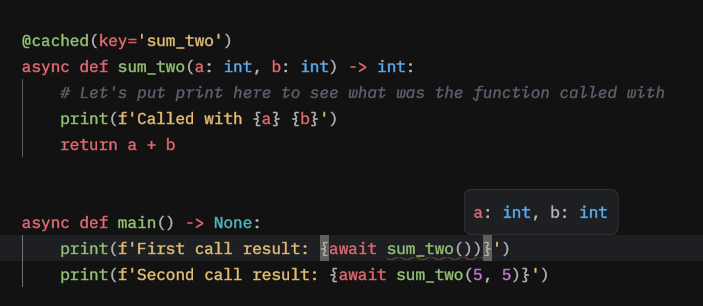
And another example, in this case, our LSP gives us the warning that we have forgotten to await the async function.

What's next
Next, we will utilize the dynamic cache key to create cache results based on function arguments.
Cached - Dynamic cache key arguments
In this tutorial, we will continue from the previous example and customize the key in the decorator.
The full code will look like this:
import asyncio

from py_cachify import init_cachify, cached


# here we are initializing py-cachify to use an in-memory cache
# for global decorators like @cached, @lock, @once
init_cachify()


# notice that we now have {a} and {b} in the cache key
@cached(key='sum_two-{a}-{b}')
async def sum_two(a: int, b: int) -> int:
    # Let's put print here to see what was the function called with
    print(f'Called with {a} {b}')
    return a + b


async def main() -> None:
    # Call the function first time with (5, 5)
    print(f'First call result: {await sum_two(5, 5)}')

    # And we will call it again to make sure it's not called but the result is the same
    print(f'Second call result: {await sum_two(5, 5)}')

    # Now we will call it with different args to make sure the function is indeed called for another set of arguments
    print(f'Third call result: {await sum_two(5, 10)}')


if __name__ == '__main__':
    asyncio.run(main())
Note: in more advanced scenarios you can also create a dedicated instance with
init_cachify(is_global=False)and useinstance.cached(...)instead of the global@cached. The dynamic key rules shown here work the same way for both global and instance-based usage.
Understanding what has changed
As you can see, we now have {a} and {b} inside our key,
what it allows py-cachify to do is dynamically craft a key for a function the decorator is being applied to.
This way it will cache the result for each set of arguments instead of creating just one key.
Note, that in this current example key 'sum_two-{}-{}' will have the same effect.
Providing a not named placeholders is supported to allow creating dynamic cache keys even for the functions that accept *args, **kwargs as their arguments.
We have also modified our main function to showcase the introduced changes.
Let's run our code
After running the example:
First call result: 10
Second call result: 10
Called with 5 10
Third call result: 15
As you can see, the function result is being cached based on the arguments provided.
What's next
In the next chapter we'll learn what other parameters @cached() decorator has.
Cached - Providing a ttl (time-to-live) and custom encoder/decoder
Explanation
Sometimes you don't need to cache a function result indefinitely and you need to cache it let's say for a day (a common case for web apps).
Py-Cachify has got you covered and allows for an optional ttl param to pass into the decorator.
This value will be passed down to a cache client and usually means how long the set value will live for in seconds.
In addition to per-decorator ttl, you can also configure a global or instance-level default_cache_ttl via init_cachify. When ttl is omitted on @cached, that default_cache_ttl is used; when you pass ttl=None, the value is stored without expiration even if default_cache_ttl is configured; when you pass an explicit integer ttl, it overrides any default.
Let's see it in action
import asyncio

from py_cachify import init_cachify, cached


# here we are initializing py-cachify to use an in-memory cache

# and setting a default_cache_ttl that will be used when ttl is omitted
init_cachify(default_cache_ttl=10)


# notice ttl, that will cache the result for one second and override default_cache_ttl
@cached(key='sum_two-{a}-{b}', ttl=1)
async def sum_two(a: int, b: int) -> int:
    # Let's put print here to see what was the function called with
    print(f'Called with {a} {b}')
    return a + b


async def main() -> None:
    # Call the function first time with (5, 5)
    print(f'First call result: {await increment_int_by(5, 5)}')

    # Let's wait for 2 seconds
    await asyncio.sleep(2)

    # And we will call it again to check what will happen

    print(f'Second call result: {await sum_two(5, 5)}')


if __name__ == '__main__':
    asyncio.run(main())
The only changes we introduced are the removal of the third call, adding the sleep, and providing a ttl param that overrides the configured default_cache_ttl.
After running the example:
// The ouput will be
Called with 5 5
First call result: 10
Called with 5 5
Second call result: 10
As you can see the cache has expired (after the 1 second ttl) and allowed the function to be called again. If we had omitted ttl entirely, the default_cache_ttl=10 configured in init_cachify would have been used instead.
Encoders/Decoders
ttl is not the only param that @cached() has available.
There is also an enc_dec which accepts a tuple of (Encoder, Decoder),
those being the methods that are going to be applied to the function result on caching and retrieving the cache value.
The required signature is Callable[[Any], Any].
But keep in mind that results should be picklable, py-cachify uses pickle, before passing the value to the cache backend.
ℹ Why it was introduced
The main reason is sometimes you have to cache something, that is not picklable by default. Even though the cases are rare, we decided to support it since it doesn't hurt to have it when it's needed :)
Introducing enc_dec
Usually provided encoder and decoder are supposed to work in tandem and not change the output value at all (since the encoder does something, and then the decoder reverts it back). But for the sake of our demonstration, we'll break that principle.
We'll introduce the following functions:
# our encoder will multiply the result by 2
def encoder(val: int) -> int:
    return val * 2


# and our decoder will do the multiplication by 3
def decoder(val: int) -> int:
    return val * 3
Now, as a result, the final output should be multiplied by 6.
All we have to do now is modify our @cached() decorator params to look like this:
@cached(key='sum_two-{a}-{b}', enc_dec=(encoder, decoder))
async def sum_two(a: int, b: int) -> int:
    # Let's put print here to see what was the function called with
    print(f'Called with {a} {b}')
    return a + b
ℹ Full file preview
import asyncio

from py_cachify import init_cachify, cached


# here we are initializing py-cachify to use an in-memory cache
init_cachify()


# our encoder will multiply the result by 2
def encoder(val: int) -> int:
    return val * 2


# and our decoder will do the multiplication by 3
def decoder(val: int) -> int:
    return val * 3


# enc_dec is provided
@cached(key='sum_two-{a}-{b}', enc_dec=(encoder, decoder))
async def sum_two(a: int, b: int) -> int:
    # Let's put print here to see what was the function called with
    print(f'Called with {a} {b}')
    return a + b


async def main() -> None:
    # Call the function first time with (5, 5), this is where the encoder will be applied before setting cache value
    print(f'First call result: {await sum_two(5, 5)}')

    # Calling the function again with the same arguments to make decoder do its job on retrieving value from cache
    print(f'Second call result: {await sum_two(5, 5)}')


if __name__ == '__main__':
    asyncio.run(main())
Running the code
After running the currently crafted file, we should get the following output:
First call result: 10
Second call result: 60
As you can see, the second call result was 60, which is 6 times bigger than the original value.
What's next
We'll see some magic that py-cachify does on a function wrap and learn how to manually reset a cache.
Cached - Manually resetting cache with reset() method
How to
Now it's time to see some ✨magic✨ happen.
You could've wondered:
What if I need to manually reset the cache on something I have cached using the @cached decorator?
Do I have to go all the way to my actual cache client and do the reset myself? How can I reset a dynamic key with certain arguments?
Don't worry py-cachify has got you covered.
Introducing reset()
Every time you wrap something with the provided decorators that py-cachify has, there is a method attached to the function you are wrapping.
Also, the method attached has the same type as the original function, so if it was async, the reset method will be async or the other way around for a sync function.
reset() has the same signature as your declared function, this way you can easily reset even the dynamic key with no issues.
Changing our example
Let's modify the code we ran previously in the dynamic keys introduction:
import asyncio

from py_cachify import init_cachify, cached


# here we are initializing py-cachify to use an in-memory cache
init_cachify()


# nothing is changing in declaration
@cached(key='sum_two-{a}-{b}')
async def sum_two(a: int, b: int) -> int:
    # Let's put print here to see what was the function called with
    print(f'Called with {a} {b}')
    return a + b


async def main() -> None:
    # Call the function first time with (5, 5)
    print(f'First call result: {await sum_two(5, 5)}')

    # Let's try resetting the cache for this specific call
    await sum_two.reset(a=5, b=5)

    # And then call the function again to see what will happen
    print(f'Second call result: {await sum_two(5, 5)}')


if __name__ == '__main__':
    asyncio.run(main())
We have added the reset call for a specific signature.
Let's now run it and see the output:
After running the example:
First call result: 10
Called with 5 5
Second call result: 10
And you can see that the cache has been reset between the two calls we have.
Instance-based reset
So far we have only used the global @cached decorator that relies on the globally initialized client.
In more advanced scenarios you might want a dedicated cache instance (for example, for a specific module or subsystem) that you can reset independently from the global one. For that, you can create a local Cachify instance using init_cachify(is_global=False) and call reset() on the wrapped function in exactly the same way.
import asyncio

from py_cachify import init_cachify


# global initialization for the top-level decorators
init_cachify()


# local instance that does NOT touch the global client
local_cachify = init_cachify(is_global=False, prefix='LOCAL-')


@local_cachify.cached(key='local-sum_two-{a}-{b}')
async def local_sum_two(a: int, b: int) -> int:
    print(f'LOCAL called with {a} {b}')
    return a + b


async def main() -> None:
    print(f'First local call: {await local_sum_two(1, 2)}')
    print(f'Second local call: {await local_sum_two(1, 2)}')

    # Reset only the local cache entry for these arguments
    await local_sum_two.reset(a=1, b=2)

    print(f'Third local call after reset: {await local_sum_two(1, 2)}')


if __name__ == '__main__':
    asyncio.run(main())
Here:
local_sum_twouses the dedicated instance configured vialocal_cachify.local_sum_two.reset(...)operates only on that instance’s cache and has no effect on any globally cached functions.- The method signature is still the same as the original function.
Multi-layer reset
You can also create multi-layer caching by stacking a local instance’s cached decorator on top of the global @cached. In that case, calling reset() on the stacked function will clear both layers for the given arguments.
import asyncio

from py_cachify import init_cachify, cached


# global initialization for the top-level decorators
init_cachify()


# local instance providing a short-lived layer over the global cache
local_cachify = init_cachify(is_global=False, prefix='LOCAL-')


@local_cachify.cached(key='local-sum_two-{a}-{b}', ttl=5)
@cached(key='sum_two-{a}-{b}', ttl=60)
async def sum_two(a: int, b: int) -> int:
    print(f'GLOBAL called with {a} {b}')
    return a + b


async def main() -> None:
    # First call: computes and populates both inner and outer caches
    print(f'First layered call: {await sum_two(2, 3)}')
    # Second call: hits outer cache only, no extra prints
    print(f'Second layered call: {await sum_two(2, 3)}')

    # Reset both local and global layers for these args
    await sum_two.reset(a=2, b=3)

    # After reset, both caches are clear for (2, 3), so the inner function is executed again
    print(f'Third layered call after reset: {await sum_two(2, 3)}')


if __name__ == '__main__':
    asyncio.run(main())
This pattern lets you compose multiple caches with different TTLs or backends while keeping the reset() API simple and predictable.
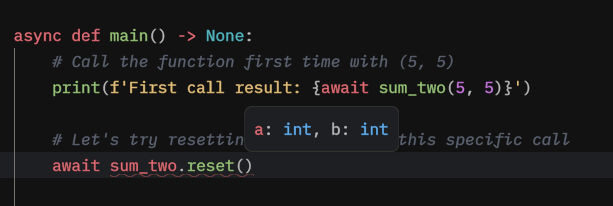
Type annotations
The reset() function has the same signature as the original function, which is nice and allows your IDE to help you with inline hints and errors:
Conclusion
This concludes our tutorial for the @cached() decorator.
A couple of important behavioral notes to keep in mind:
- When you do not pass
ttlto@cached, the effective TTL is taken from the configureddefault_cache_ttl(if any), and if both are omitted the value is stored without expiration; passingttl=Nonealways forces “no expiration”, even when a default TTL exists.
Next, we'll learn about the locks and a handy decorator that will help you incorporate locking logic without a headache.
Locks
Introduction to Locks (Mutex)
In simple terms, a lock, also known as a mutex,
is like electronic door locks that allow only one person to enter a room,
or, in terms when it comes to coding - to make sure that certain code is
being only run once at a time. This prevents data inconsistencies and race conditions.
py-cachify provides tools for creating and managing these locks, so you can keep your logic safe and organized.
py-cachify's locks
This tutorial will show you how to use locks provided by py-cachify, what params do they have,
and showcase some common use case scenarios.
Note: py-cachify's main focus is to provide a convenient way to use distributed locks and in no way replace built-in ones. This type of lock is usually utilized heavily in web development in particular when scaling comes into play and the synchronization problems are starting to surface as well as race conditions.
What's next
We will dive deeper and look at some examples.
Lock - Getting Started with Locks in Py-Cachify
Starting slow
Let's write the following code:
import asyncio

from py_cachify import init_cachify, lock


# here we initializing a py-cachify to use an in-memory cache, as usual
init_cachify()


async def main() -> None:

    # this is a sync lock
    with lock(key='cool-sync-lock'):
        print('this code is locked')

    # and this is an async lock
    async with lock(key='cool-async-lock'):
        print('this code is locked, but using async cache')


if __name__ == '__main__':
    asyncio.run(main())
If we run the example:
this code is locked, but using async cache
As you can see, we just had both of our prints printed out without any exceptions.
Notice how we utilized both sync and async context managers from a single lock object,
by doing this py-cachify allows you to use the lock in any environment your application might work in (sync or async),
without splitting those into for example async_lock and sync_lock.
From now on we will do everything in async, but you can also follow the tutorial writing the same sync code :)
Let's break it
Now, we'll adjust our previous example:
import asyncio

from py_cachify import init_cachify, lock


# here we initializing a py-cachify to use an in-memory cache, as usual
init_cachify()


async def main() -> None:

    # and this is an async lock
    async with lock(key='cool-async-lock'):
        print('this code is locked and will be executed')

        async with lock(key='cool-async-lock'):
            print('we are attempting to acquire a new lock with the same key and will not make it to this print')


if __name__ == '__main__':
    asyncio.run(main())
After running this piece:
this code is locked and will be executed
cool-async-lock is already locked! # this is a .warning from log
# traceback of an errorTraceback (most recent call last):
...
File "/py_cachify/backend/lock.py", line 199, in _raise_if_cached
raise CachifyLockError(msg)
py_cachify.backend.exceptions.CachifyLockError: cool-async-lock is already locked!
And as expected, at the line where we are trying to acquire a lock with the same name - we get an error that this key is already locked.
This was a showcase of the very basic piece of locks (or mutexes) and everything else everywhere is built on top of this basic concept.
What's next
We will see what parameters does lock object has and what cases can we cover with the help of those.
Lock - Lock Parameters in Py-Cachify
Parameters
Here, we will detail the various parameters that you can configure when creating a lock and how to use them effectively.
Explanation of Parameters
-
key:
- This is a mandatory parameter that uniquely identifies the lock. Each operation you wish to manage with a lock should have a unique key.
-
nowait:
- Setting
nowait=True(default) means that if the lock is already held by another lock, your current lock won't wait and will immediately raise aCachifyLockError. - If
nowait=False, your lock will wait until the lock becomes available, up to the duration specified bytimeout.
- Setting
-
timeout:
- Use this parameter to specify how long (in seconds) the lock should wait for to acquire a lock. If the lock does not become available within this time, a
CachifyLockErroris raised. - Timeout only works if
nowaitisFalse.
- Use this parameter to specify how long (in seconds) the lock should wait for to acquire a lock. If the lock does not become available within this time, a
- exp:
- This parameter sets an expiration time (in seconds) for the lock. After this time, the lock will automatically be released, regardless of whether the operation has been completed.
- This can help to prevent deadlocks in cases where an app may fail to release the lock due to an error or abrupt termination.
Lock Polling Interval (Global Setting)
When nowait=False, the lock uses a polling mechanism to check if the lock has become available. The interval between these polling attempts is controlled by the lock_poll_interval parameter in init_cachify():
- Default:
0.1seconds (100 milliseconds) - Lower values: More responsive lock acquisition but higher load on the cache backend
- Higher values: Reduced backend load but potentially longer wait times after a lock is released
You can configure this when initializing py-cachify:
from py_cachify import init_cachify

# Poll every 500ms instead of the default 100ms
init_cachify(lock_poll_interval=0.5)
This setting applies to all locks and once decorators that use this Cachify instance.
Some examples
Let's write the example showcasing every parameter and then go through the output to understand what is happening:
import asyncio

from py_cachify import init_cachify, lock


# Initialize py-cachify to use in-memory cache
init_cachify()


async def main() -> None:
    example_lock = lock(key='example-lock', nowait=False, timeout=4, exp=2)

    async with example_lock:
        print('This code is executing under a lock with a timeout of 4 seconds and expiration set to 2 seconds')

        async with example_lock:
            print('This code is acquiring the same lock under the previous one.')


if __name__ == '__main__':
    asyncio.run(main())
After running the example:
example-lock is already locked!
example-lock is already locked!
example-lock is already locked!
example-lock is already locked!
This code is acquiring the same lock under the previous one.
As you can see we got no errors, because the lock expired after 2 seconds, and the timeout (maximum wait time to acquire a lock) is set to 4, which is enough to wait for the first expiration of the first acquire.
What's next
Next, we'll see what methods do lock objects have in py-cachify.
Lock - Lock Methods in Py-Cachify
Parameters are not the only things that lock in py-cachify has. There are also a couple of handy methods.
is_locked() and is_alocked()
The method is_locked() checks if the lock associated with the specified key is currently held.
The method is_alocked() is the asynchronous counterpart of is_locked(). It checks if the lock is held, but it is designed to be used in an async context.
Both methods return a bool.
Example for is_alocked()
Let's modify the previous example a little bit:
import asyncio

from py_cachify import init_cachify, lock


# Initialize py-cachify to use in-memory cache
init_cachify()


async def main() -> None:
    example_lock = lock(key='example-lock', nowait=False, timeout=4, exp=2)

    async with example_lock:
        print('This code is executing under a lock with a timeout of 4 seconds and expiration set to 2 seconds')
        while await example_lock.is_alocked():
            print('Lock is still active! Waiting...')
            await asyncio.sleep(1)

        print('Lock has been released')
        async with example_lock:
            print('Acquire the same lock again')


if __name__ == '__main__':
    asyncio.run(main())
After running the example:
Lock is still active! Waiting...
Lock is still active! Waiting...
Lock has been released
Acquire the same lock again
As you can see we were checking if the lock has been released inside a while loop before reacquiring it.
Remember that we are talking about distributed locks, which means that you could check if the lock is being held from another process or even another machine in a real app!
release() and arelease()
The method release() releases the lock associated with the given key.
It is called internally when a lock context manager exits.
The method arelease() is similar to the release() but is used in an asynchronous context.
Modifying the example
We'll introduce some small changes to the previous code:
import asyncio

from py_cachify import init_cachify, lock


# Initialize py-cachify to use in-memory cache
init_cachify()


async def main() -> None:
    example_lock = lock(key='example-lock', nowait=False, timeout=4, exp=2)

    async with example_lock:
        print('This code is executing under a lock with a timeout of 4 seconds and expiration set to 2 seconds')

        await example_lock.arelease()

        print(f'Is the lock currently locked: {await example_lock.is_alocked()}')
        async with example_lock:
            print('Acquire the same lock again')


if __name__ == '__main__':
    asyncio.run(main())
After running the example:
Is the lock currently locked: False
Acquire the same lock again
This time we forcefully reset the lock instead of relying on our while loop to check if it has expired.
Conclusion
Understanding these methods allows for better management of locks within your applications. Depending on your application’s architecture (sync vs. async), you'll choose between the synchronous or asynchronous methods to check lock status or release locks after use. This ensures that resources are managed efficiently and that concurrently executed code does not produce race conditions or inconsistent data.
What's next
We'll see how can we use the lock as a decorator and see the ✨magic✨ that py-cachify does.
Lock - Using Lock as a Decorator
Parameters and Methods
You can also use the lock that py-cachify has as a decorator.
It accepts the same parameters as a normal lock and also automatically detects which function it is being applied to
(sync or async) and uses the correct wrapper.
Differences with regular usage
- The first difference (and advantage) is that when using
lockas a decorator you can create dynamic cache keys (same as incacheddecorator). - The second one is since the decorator *knows* what type of function it is being applied to there is no need to attach both
is_alockedandis_lockedto the wrapped function, so it only attachesis_locked(*args, **kwargs)that is going to be the same type as the function that was wrapped (i.e. sync or async)
Examples
Let's write some code that showcases all the methods with default lock params.
import asyncio

from py_cachify import init_cachify, lock, CachifyLockError


# Initialize py-cachify to use in-memory cache
init_cachify()


# Function that is wrapped in a lock and just sleeps for certain amount of time
@lock(key='sleep_for_lock-{arg}', nowait=True)
async def sleep_for(arg: int) -> None:
    await asyncio.sleep(arg)


async def main() -> None:
    # Calling a function with an arg=3
    _ = asyncio.create_task(sleep_for(3))
    await asyncio.sleep(0.1)

    # Checking if the arg 3 call is locked (should be locked)
    print(f'Sleep for is locked for argument 3: {await sleep_for.is_locked(3)}')
    # Checking if the arg 4 call is locked (should not be locked)
    print(f'Sleep for is locked for argument 4: {await sleep_for.is_locked(4)}')

    task = asyncio.create_task(sleep_for(5))
    await asyncio.sleep(0.1)
    # Checking if our call with arg=5 is locked
    print(f'Sleep for is locked for argument 5: {await sleep_for.is_locked(5)}')
    # Forcefully release a lock
    await sleep_for.release(5)
    # Doing a second check - shouldn't be locked now
    print(f'Sleep for is locked for argument 5: {await sleep_for.is_locked(5)}')
    await task

    # Trying to run 2 tasks with the same argument (and catching the exception)
    try:
        await asyncio.gather(sleep_for(1), sleep_for(1))
    except CachifyLockError as e:
        print(f'Exception: {e}')


if __name__ == '__main__':
    asyncio.run(main())
After running the example:
Sleep for is locked for argument 4: False
Sleep for is locked for argument 5: True
Sleep for is locked for argument 5: False
sleep_for_lock-1 is already locked!
Exception: sleep_for_lock-1 is already locked!
Here we tried to showcase all the flexibility you have when wrapping functions with the lock.
Conslusion
This concludes our tutorial for the lock that py-cachify provides.
The full API reference can be found here.
Once Decorator
Once - Decorator for background tasks
Description
The @once decorator is a convenience wrapper around the same distributed locking mechanism used by lock, but tailored for “only one run at a time” semantics on a given key.
once can come in handy when you have a lot of background tasks, which usually are powered by celery, darq, taskiq, or dramatiq.
Theoretical example
Let's say we have some sort of a spawner task, which spawns a lot of small ones. Like, for example, the spawner gets all the orders in progress and submits a task for each one to check the status on it.
It could look like this:
from celery import shared_task

# This is scheduled to run every 5 minutes
@shared_task()
def check_in_progress_orders() -> None:
    orders = ...  # hit the database and get all orders
    [check_order.s(order_id=order.id).delay() for order in orders]


# This is being spawned from the previous one
@shared_task()
def check_order(order_id: UUID) -> None
    # check the order progress, update state, save
So in this scenario, we don't care about the results of each task, but we DO care that we are not running the second task for the same order_id twice
since it could break things.
This is where @once could come in handy: it will make sure that only one task is being run at the same time for a given order_id, and all subsequent tasks on the same order_id will exit early while at least one task is running.
The full code will look like this:
from py_cachify import once
from celery import shared_task

# This is scheduled to run every 5 minutes
@shared_task()
def check_in_progress_orders() -> None:
    orders = ...  # hit the database and get all orders
    [check_order.s(order_id=order.id).delay() for order in orders]


# This is being spawn from the previous one
@shared_task()
@once(key='check_order-{order_id}', raise_on_locked=False, return_on_locked=None)  # raise_on_locked and return_on_locked can be omitted (those values are defaults)
def check_order(order_id: UUID) -> None
    # check the order progress, update state, save
    pass
This will make sure you won't run into multiple update tasks running at the same time for one order.
What's next
You can always check the full reference for once here.
Conslusion
This concludes the tutorial for py-cachify.
We have covered the basics of the package and glanced over common cases, the topics of caching and locking are pretty common yet they are always unique to the specifics of the app and tasks that the programmer wants to solve.
Py-Cachify tries to help you cover your specific cases by giving you lock- and once-based tools built on the same underlying mechanism, so you can adapt them to your needs without bloating your codebase.
For full API reference here.
API Reference
API Reference for init_cachify()
Overview
The init_cachify function initializes the py-cachify library, setting up the necessary synchronous and asynchronous
clients along with configuration options for caching, locking, and pool management.
There are two main ways to use it:
- As a global initializer (the default), where you only care about the global decorators
like
cached,lock,once, andpooled, and you ignore the return value. - As a factory for dedicated instances, where you call it with
is_global=Falseto obtain aCachifyinstance that you use directly viainstance.cached(...),instance.lock(...),instance.once(...),instance.pool(...), andinstance.pooled(...).
This function must be called at least once (with is_global=True) before using the global decorators.
If you are upgrading from 2.x, you may also want to review the 3.0.0 release notes for a high-level summary of new configuration options (such as default_cache_ttl) and behavior changes that affect initialization.
Function: init_cachify
Description
init_cachify configures the core caching, locking, and pool management client used by py-cachify.
By default (is_global=True), it:
- Creates (or wires) the underlying clients.
- Registers them as the global client used by the top-level APIs:
py_cachify.cachedpy_cachify.lockpy_cachify.oncepy_cachify.poolpy_cachify.pooled
Optionally (is_global=False), it:
- Creates an independent client that is not registered globally.
- Returns a
Cachifyinstance that exposes instance-scoped decorators: Cachify.cachedCachify.lockCachify.onceCachify.poolCachify.pooled
Signature
from typing import Optional

from py_cachify import init_cachify
from py_cachify._backend._types._common import SyncClient, AsyncClient

def init_cachify(
    sync_client: Optional[SyncClient] = None,
    async_client: Optional[AsyncClient] = None,
    default_lock_expiration: Optional[int] = 30,
    default_cache_ttl: Optional[int] = None,
    prefix: str = 'PYC-',
    lock_poll_interval: float = 0.1,
    default_pool_slot_expiration: Optional[int] = 600,
    *,
    is_global: bool = True,
) -> Cachify:  # returns a Cachify instance
    ...
Parameters
| Parameter | Type | Description |
|---|---|---|
sync_client |
Optional[SyncClient] |
The synchronous client used for caching operations. If None, a new in-memory client is created. |
async_client |
Optional[AsyncClient] |
The asynchronous client used for caching operations. If None, a new async client is created around an in-memory cache (see notes below for details). |
default_lock_expiration |
Optional[int] |
Default expiration time (in seconds) for locks. Defaults to 30. |
default_cache_ttl |
Optional[int] |
Default TTL (in seconds) for cached values when a decorator omits ttl. None (the default) means values are stored without expiration when ttl is not explicitly specified. |
prefix |
str |
String prefix to prepend to all keys used in caching and locks. Defaults to 'PYC-'. |
lock_poll_interval |
float |
Interval in seconds between lock acquisition attempts when polling. Defaults to 0.1. Lower values make locks more responsive but increase load on the cache backend. |
default_pool_slot_expiration |
Optional[int] |
Default TTL (in seconds) for pool slots when a pool omits slot_exp. Defaults to 600 (10 minutes). None means slots never expire. See pool slot expiration section below for details. |
is_global |
bool |
Controls whether this call registers a global client. If True (default), the created client becomes the global backend used by the top-level cached, lock, once, pool, and pooled decorators. If False, the global backend is not touched and only a dedicated Cachify instance is returned. |
Returns
Cachify: an instance object that exposes instance-scoped decorators:Cachify.cached(...)Cachify.lock(...)Cachify.once(...)Cachify.pool(...)Cachify.pooled(...)
When is_global=True (default)
- The returned
Cachifyinstance and the top-level decorators (cached,lock,once,pool,pooled) share the same underlying client. - This is the traditional “initialize the library for my app” mode.
- Most users who only rely on global decorators do not need to keep or use the return value.
When is_global=False
- The global client is left untouched.
- The returned
Cachifyinstance is fully independent and must be used explicitly:
instance = init_cachify(is_global=False)
@instance.cached(key='my-key-{x}')
def f(x: int) -> int:
    ...
- This is the mode to use when you want multiple, isolated caches/lockers in the same process (for example, different modules or subsystems using different backends or prefixes).
Defaulting Behavior
The defaulting logic is designed so that:
- If both
sync_clientandasync_clientareNone: sync_clientis set to a new in-memory cache.-
async_clientis set to a new async wrapper that uses that same in-memory cache under the hood. -
If
sync_clientis provided and is an in-memory cache implementation used by py-cachify: -
And
async_clientisNone:async_clientis set to a new async wrapper that reuses that same in-memory cache instance.
-
If
sync_clientis provided and is not that in-memory cache implementation: - And
async_clientisNone:async_clientis set to a new async wrapper over a fresh in-memory cache.
In practice:
- For typical sync-only or async-only applications, you will usually provide one client:
- Either
sync_client=...or async_client=...- If you need both sync and async usage to share the same backend (for example, Redis), pass both clients explicitly.
Default cache TTL behavior
The default_cache_ttl parameter controls the default TTL for cached values used by both the global @cached decorator and instance-based Cachify.cached:
- If
default_cache_ttlis an integer (for example,60): - Any
@cached(...)orCachify.cached(...)call that omitsttlwill use that integer as the TTL. - If
default_cache_ttlisNone(the default): - Any decorator that omits
ttlwill store values without expiration (behaving likettl=Nonefor the underlying client). - If a decorator passes an explicit
ttl: ttl=Nonemeans "no expiration" regardless ofdefault_cache_ttl.ttl=<int>uses that integer and ignoresdefault_cache_ttl.
Lock polling behavior
The lock_poll_interval parameter controls how frequently py-cachify retries lock acquisition when a lock is already held by another process:
- When a lock is requested with
nowait=False, the library polls the cache backend until the lock becomes available or thetimeoutis reached. lock_poll_interval(default:0.1seconds) specifies the sleep duration between polling attempts.- Lower values (e.g.,
0.01) make lock acquisition more responsive but increase the number of requests to the cache backend. - Higher values (e.g.,
0.5or1.0) reduce backend load but may increase the time before a waiting lock is acquired after the previous holder releases it.
This setting applies globally to all locks created from this Cachify instance, including those used by the @lock and @once decorators.
Example:
from py_cachify import init_cachify

# Reduce polling frequency for locks to decrease Redis load
init_cachify(
    lock_poll_interval=0.5,  # Poll every 500ms instead of 100ms
    default_lock_expiration=30,
)
Default pool slot expiration behavior
The default_pool_slot_expiration parameter controls the default TTL for pool slots used by both the global pool() / @pooled and instance-based Cachify.pool() / Cachify.pooled:
- If
default_pool_slot_expirationis an integer (for example,600): - Any
pool(...)or@pooled(...)call that omitsslot_expwill use that integer as the slot TTL. - If
default_pool_slot_expirationisNone: - Any pool that omits
slot_expwill create slots without expiration. - If a pool passes an explicit
slot_exp: slot_exp=Nonemeans "no expiration" regardless ofdefault_pool_slot_expiration.slot_exp=<int>uses that integer and ignoresdefault_pool_slot_expiration.
Slot expiration is important for cleaning up orphaned slots if a process crashes while holding a slot. However, expiration does not interrupt running code; it only affects the pool's internal count.
Example:
from py_cachify import init_cachify

# Set a 5 minute default for all pool slots
init_cachify(
    default_pool_slot_expiration=300,
)
Usage Examples
1. Classic global initialization (most common)
For most applications you just configure a global backend once and only use the top-level decorators:
from redis import from_url as redis_from_url
from redis.asyncio import from_url as async_redis_from_url

from py_cachify import cached, init_cachify, lock, once, pooled

# Global initialization (returns a Cachify instance, but we don't need it here)
init_cachify(
    sync_client=redis_from_url("redis://localhost:6379/0"),
    async_client=async_redis_from_url("redis://localhost:6379/1"),
    default_lock_expiration=60,
    default_cache_ttl=300,
    default_pool_slot_expiration=600,
    prefix='APP-',
)

@cached(key='sum-{a}-{b}', ttl=30)
def sum_two(a: int, b: int) -> int:
    return a + b

@lock(key='critical-{id}', nowait=False, timeout=10)
def critical_section(id: int) -> None:
    ...

@once(key='run-once-{id}', raise_on_locked=True)
def run_once(id: int) -> None:
    ...

@pooled(key='worker-pool', max_size=5)
async def worker_task(data: str) -> str:
    return f'processed-{data}'
In this mode:

- `cached`, `lock`, `once`, `pool`, and `pooled` all use the global client configured by `init_cachify()`.
- If you never call `init_cachify`, using those decorators will raise `CachifyInitError`.

### 2. Creating a dedicated instance without touching the global client

Sometimes you want a separate cache/locking backend for a particular subsystem or for testing. For that, you can create an independent instance:

```python
from py_cachify import init_cachify

# Global client, used by top-level decorators
init_cachify(
    # e.g. some Redis or other backend
    sync_client=...,
    async_client=...,
    prefix='GLOBAL-',
)

# Local instance: this does NOT modify the global client
local_cachify = init_cachify(
    sync_client=None,    # use in-memory sync cache
    async_client=None,   # in-memory async wrapper
    prefix='LOCAL-',
    is_global=False,
)

@local_cachify.cached(key='local-sum-{x}-{y}')
def local_sum(x: int, y: int) -> int:
    return x + y

@local_cachify.lock(key='local-lock-{name}')
def local_locked(name: str) -> None:
    ...

@local_cachify.once(key='local-once-{task_id}')
def local_once(task_id: str) -> None:
    ...

@local_cachify.pooled(key='local-pool', max_size=3)
async def local_worker(data: str) -> str:
    ...
Here:
- The top-level decorators still use the global client (with prefix
GLOBAL-). - All
local_cachify.*decorators use a completely independent client (with prefixLOCAL-). - Caches and locks for the local instance will not interfere with global ones even if the keys look similar.
3. Multiple instances and isolation
You can create as many separate instances as you need, for example:
from py_cachify import init_cachify

user_cache = init_cachify(prefix='USER-', is_global=False)
metrics_cache = init_cachify(prefix='METRICS-', is_global=False)

@user_cache.cached(key='user-{user_id}')
def get_user(user_id: int) -> dict:
    ...

@metrics_cache.cached(key='metric-{name}')
def compute_metric(name: str) -> float:
    ...
Even if the underlying clients are both in-memory, the prefixes and separation of clients ensure that:
- Entries written via
user_cache.cacheddo not affect or collide with those written viametrics_cache.cached. - You can swap backends independently (e.g. Redis for metrics, in-memory for users) by passing different
sync_client/async_clientto eachinit_cachify(..., is_global=False).
Custom Clients
The py-cachify library supports Redis (and Redis-compatible backends such as DragonflyDB, which use the same client APIs) for synchronous and asynchronous clients out of the box.
However, if you want to use other caching backends (such as Memcached, database-based, or file-based solutions),
you can create custom clients by complying with the SyncClient and AsyncClient protocols.
These custom implementations should match the following method signatures:
- For synchronous clients (
SyncClient): get(name: str) -> Optional[Any]set(name: str, value: Any, ex: Optional[int] = None, nx: bool = False) -> Any-
delete(*names: str) -> Any -
For asynchronous clients (
AsyncClient): get(name: str) -> Awaitable[Optional[Any]]set(name: str, value: Any, ex: Optional[int] = None, nx: bool = False) -> Awaitable[Any]delete(*names: str) -> Awaitable[Any]
NX flag and locking/pool semantics
The nx flag on set is crucial for the correctness of the locking APIs (lock and once) and pool management (pool and pooled):
- When
nxis False: set(name, value, ex=..., nx=False)should behave like a normal "upsert" operation: always set/overwrite the key.-
The return value is backend-specific and not used by py-cachify in this mode.
-
When
nxis True: set(name, value, ex=..., nx=True)must implement set-if-not-exists semantics atomically:- If the key does not exist (or is treated as expired), it should set the value and return a truthy value (e.g.
True,"OK",b"OK"). - If the key already exists (and is not expired), it should not modify the value and return a falsy value (e.g.
False,None).
- If the key does not exist (or is treated as expired), it should set the value and return a truthy value (e.g.
- py-cachify relies on this behavior to implement
lock/onceas “acquire lock if free” via a single atomic operation. - In particular, we interpret the return value of
set(..., nx=True)as a boolean indicating whether the lock has been acquired.
For Redis and Redis-compatible backends such as DragonflyDB, this usually maps directly to:
which internally uses the SET key value NX EX ttl command and returns a truthy value when the key was set and None when it was not.
For custom backends:
- To have correct distributed locking semantics, you must implement
set(..., nx=True)as an atomic "set-if-absent" operation and return a truthy/falsy value as described above. - If your backend cannot provide atomic
nx=Truebehavior,lockandoncewill only offer best-effort mutual exclusion and may admit concurrent entries under rare races.
By adhering to these protocols (including the nx semantics), you can integrate your custom backend while maintaining compatibility with py-cachify's caching, locking, and pool management mechanisms.
Example Custom Client Integration
from typing import Any, Optional, Awaitable

class CustomSyncClient:
    def get(self, name: str) -> Optional[Any]:
        # Implementation for getting a value from the cache
        ...

    def set(self, name: str, value: Any, ex: Optional[int] = None, nx: bool = False) -> Any:
        # Implementation for setting a value in the cache.
        # When nx=True, this MUST act as an atomic "set-if-not-exists" and
        # return a truthy value on success and a falsy value on failure.
        ...

    def delete(self, *names: str) -> Any:
        # Implementation for deleting keys from the cache
        ...

class CustomAsyncClient:
    async def get(self, name: str) -> Optional[Any]:
        # Implementation for asynchronously getting a value from the cache
        ...

    async def set(self, name: str, value: Any, ex: Optional[int] = None, nx: bool = False) -> Awaitable[Any]:
        # Implementation for asynchronously setting a value in the cache.
        # When nx=True, this MUST act as an atomic "set-if-not-exists" and
        # return a truthy value on success and a falsy value on failure.
        ...

    async def delete(self, *names: str) -> Awaitable[Any]:
        # Implementation for asynchronously deleting keys from the cache
        ...

# Initialize a global Cachify client with custom clients
init_cachify(
    sync_client=CustomSyncClient(),
    async_client=CustomAsyncClient(),
)

# Or create a dedicated instance without touching global state
custom_cachify = init_cachify(
    sync_client=CustomSyncClient(),
    async_client=CustomAsyncClient(),
    is_global=False,
)
This flexibility allows you to utilize a caching backend of your choice while leveraging the py-cachify library's capabilities effectively, including robust lock / once behavior when nx is implemented atomically.
Notes
- It is crucial to call
init_cachifywithis_global=Trueat least once before performing any global caching, locking, or pool operations withcached,lock,once,pool, orpooled. Failing to do so will result in aCachifyInitErrorwhen attempting to access global features. Cachifyinstances created withis_global=Falsedo not depend on the global initialization and can be used independently.- The
sync_clientandasync_clientparameters should comply with theSyncClientandAsyncClientprotocols, respectively.
API Reference for @cached() Decorator
Overview
The cached decorator provides a caching mechanism that stores the result of a function based on a specified key, time-to-live (TTL), and optional encoding/decoding functions. It can be applied to both synchronous and asynchronous functions, facilitating quick access to previously computed results. This includes respecting a configurable default_cache_ttl when no explicit ttl is provided.
Function: cached
Description
The cached decorator caches the results of a function execution using a unique key. If the function is called again with the same key before the TTL expires, the cached result is returned instead of re-executing the function. This is particularly useful for expensive computations or IO-bound tasks.
There are two main ways to use caching with py-cachify:
- Via the global
cacheddecorator exported frompy_cachify, which relies on a globally initialized client. - Via instance-based decorators obtained from a
Cachifyobject created byinit_cachify(is_global=False).
Parameters
| Parameter | Type | Description |
|---|---|---|
key |
str |
The key used to identify the cached result, which can utilize formatted strings to create dynamic keys. (i.e. key='my_key-{func_arg}') |
ttl |
Union[int, None], optional |
Time-to-live (seconds) for the cached result. If omitted, the decorator uses the cache client's default_cache_ttl (configured via init_cachify). If ttl is None, the value is stored without expiration. If ttl is an integer, that value is used directly and overrides any default_cache_ttl. |
enc_dec |
Union[Tuple[Encoder, Decoder], None], optional |
A tuple containing the encoding and decoding functions for the cached value. Defaults to None, which means that no encoding or decoding functions will be applied. |
Default TTL behavior
The effective TTL for a cached value is determined as follows (higher items take precedence over lower ones):
- If you pass an explicit integer, for example
@cached(..., ttl=30), that TTL is used and overrides anydefault_cache_ttl. - If you pass
ttl=None, the cache entry is stored without expiration (infinite TTL in most backends), even ifdefault_cache_ttlis configured. - If you omit
ttlentirely, the decorator will fall back to the underlying client'sdefault_cache_ttl: default_cache_ttlis configured viainit_cachify(default_cache_ttl=...)for both global and instance-based usage.- If
default_cache_ttlisNone(the default), omittingttlbehaves like “no expiration”.
This lets you define a global or instance-specific default TTL once and only override it where needed. When you do not configure default_cache_ttl at all (leaving it as None) and also omit ttl on the decorator, the behavior is the same as in previous versions of py-cachify: cached values are stored without expiration by default.
Returns
WrappedFunctionReset: A wrapped function (either synchronous or asynchronous) with an additionalresetmethod attached for cache management. Thereset(*args, **kwargs)method allows the user to manually reset the cache for the function using the same key.
Method Behavior
-
For Synchronous Functions:
- Checks if a cached value exists for the provided key.
- If the cached value exists, it returns the decoded value.
- If not, it executes the function, caches the result (after encoding, if specified), and then returns the result.
-
For Asynchronous Functions:
- Similar checks are performed in an asynchronous context using
await. - The caching behavior mirrors the synchronous version.
- Similar checks are performed in an asynchronous context using
Global Usage Example
from py_cachify import cached, init_cachify


# Configure a default cache TTL of 60 seconds for all cached values
init_cachify(default_cache_ttl=60)


@cached('my_cache_key')
def compute_expensive_operation(param: int) -> int:
    # Uses default_cache_ttl=60 as TTL
    return param * 2


@cached('my_async_cache_key-{param}', ttl=30)
async def fetch_data(param: int) -> dict:
    # Overrides the default and uses ttl=30
    return {'data': param}
Instance-based Usage
If you need multiple independent caches (for example, per module or subsystem), you can create dedicated Cachify instances via init_cachify(is_global=False) and use their cached method instead of the global decorator.
from py_cachify import init_cachify

# Create a dedicated instance that does not affect the global client
# and set a default TTL of 300 seconds for this instance
local_cachify = init_cachify(is_global=False, prefix='LOCAL-', default_cache_ttl=300)
@local_cachify.cached(key='local-{x}-{y}')
def local_sum(x: int, y: int) -> int:
    # Uses the instance-level default_cache_ttl=300
    return x + y
@cached(...)(global) uses the client configured by a globalinit_cachify()call.@local_cachify.cached(...)uses a client that is completely independent from the global one.
Multi-layer Usage
It is possible to layer caches by stacking cached decorators (for example, a global cache inside a local instance cache).
from py_cachify import cached, init_cachify

# Global initialization
init_cachify()

# Local instance with a shorter TTL that wraps the global one
local = init_cachify(is_global=False, prefix='LOCAL-')

@local.cached(key='local-expensive-{x}', ttl=5)
@cached(key='expensive-{x}', ttl=60)
def expensive(x: int) -> int:
    return x * 10
In this scenario:
- The outer cache (local instance) provides a short-lived layer over the inner global cache.
- Could be useful to add in-memory cache over a Redis/Dragonfly cache, to further speed up execution (useful for hard to refactor N+1 processing, for example).
- Calling
expensive.reset(x)will: - Clear the local cache entry for that call.
- Attempt to call
reseton the inner cached layer as well, if present, so both layers are cleared for that key.
This makes multi-layer setups behave intuitively when resetting cached values.
Resetting the Cache
You can reset the cache for either a synchronous or asynchronous function by calling the reset method attached to the wrapped function.
# Reset cache for a synchronous function
compute_expensive_operation.reset()

# Reset cache for an asynchronous function
await fetch_data.reset(param='param-value')
For instance-based usage, the pattern is the same:
Notes
- Ensure that both the serialization and deserialization functions defined in
enc_decare efficient to preserve optimal performance. - If py-cachify is not initialized through
init_cachifywithis_global=True, using the global@cacheddecorator will raise aCachifyInitErrorat runtime. Cachifyinstances created withis_global=Falsedo not depend on global initialization and can be used independently.
Type Hints Remark
Currently, Python's type hints have limitations in fully capturing a function's original signature when transitioning to a protocol-based callable in a decorator, particularly for methods (i.e., those that include self). ParamSpec can effectively handle argument and keyword types for functions but doesn't translate well to methods within protocols like WrappedFunctionReset. I'm staying updated on this issue and recommend checking the following resources for more insights into ongoing discussions and proposed solutions:
- Typeshed Pull Request #11662
- Mypy Pull Request #17123
- Python Discussion on Allowing Self-Binding for Generic ParamSpec
Once any developments occur, I will quickly update the source code to incorporate the changes.
API Reference for lock()
Overview
The lock module provides a mechanism for managing locking within synchronous and asynchronous contexts.
The main class, lock, combines both synchronous and asynchronous locking operations and relies on an underlying cache client that supports atomic "set-if-not-exists" (nx) semantics for correct distributed locking behavior.
There are two main ways to use locking with py-cachify:
- Via the global
lockfactory exported frompy_cachify, which relies on a globally initialized client. - Via instance-based locking obtained from a
Cachifyobject created byinit_cachify(is_global=False).
Class: lock
Description
The lock class manages locks using a specified key, with options for waiting and expiration.
It can be used in both synchronous and asynchronous contexts.
Parameters
| Parameter | Type | Description |
|---|---|---|
key |
str |
The key used to identify the lock. |
nowait |
bool, optional |
If True, do not wait for the lock to be released and raise immediately. Defaults to True. |
timeout |
Union[int, float], optional |
Time in seconds to wait for the lock if nowait is False. Defaults to None. |
exp |
Union[int, None], optional |
Expiration time for the lock. Defaults to UNSET and falls back to the global setting in cachify. |
Methods
-
__enter__() -> Self- Acquire a lock for the specified key as a context manager, synchronous.
-
release() -> None- Release the lock that is currently being held, synchronous.
-
is_locked() -> bool- Check if the lock is currently held, synchronous.
-
__aenter__() -> Self- Async version of
__enter__to acquire a lock as an async context manager.
- Async version of
-
arelease() -> None- Release the lock that is currently held, asynchronously.
-
is_alocked() -> bool- Check if the lock is currently held asynchronously.
-
as a
decorator- Decorator to acquire a lock for the wrapped function on call, for both synchronous and asynchronous functions.
- Attaches the following methods to the wrapped function:
is_locked(*args, **kwargs): Check if the function is currently locked.release(*args, **kwargs): Release the lock associated with the function.
Error Handling
CachifyLockError: Raised when an operation on a lock is invalid or a lock cannot be acquired.
Backend Requirements and nx Semantics
The correctness of lock (and decorators built on top of it) depends on the underlying cache client providing an atomic "set-if-not-exists" operation via an nx flag:
- When
nx=False, asetcall should behave like a normal upsert and overwrite existing values. - When
nx=True, asetcall must atomically set the value only if the key does not already exist, and return a truthy indication on success and a falsy indication otherwise.
Built-in clients implement this behavior and use it to acquire and release locks safely. Custom clients should follow the same contract as documented in the initialization reference to ensure that locks behave correctly in concurrent and distributed scenarios.
Lock Polling and nowait=False
When you create a lock with nowait=False, the library uses a polling mechanism to repeatedly attempt lock acquisition until it succeeds or the timeout is reached:
- The lock checks availability at intervals specified by
lock_poll_interval(configured ininit_cachify()) - Default interval:
0.1seconds (100ms) - Between attempts, the lock sleeps to avoid busy-waiting and reduce load on the cache backend
- Once the lock is acquired or the timeout expires, polling stops
You can adjust lock_poll_interval when initializing to trade off between responsiveness and backend load:
from py_cachify import init_cachify, lock

# Use a longer polling interval to reduce Redis load
init_cachify(lock_poll_interval=0.5)

# This lock will check every 500ms when waiting
@lock(key='heavy-operation', nowait=False, timeout=30)
def process_large_dataset():
    ...
For more details, see the initialization reference.
Usage Example
from py_cachify import lock

@lock('my_lock_key-{arg}', nowait=True)
def my_function(arg: str) -> None:
    # Critical section of code goes here
    pass


with lock('my_lock_key'):
    # Critical section of code goes here
    pass

async with lock('my_async_lock_key'):
    # Critical section of async code goes here
    pass
By using the lock class, you'll ensure that your function calls are properly synchronized, preventing race conditions in shared resources.
Instance-based usage
If you need multiple, independent locking backends (for example, per module or subsystem), you can create dedicated Cachify instances via init_cachify(is_global=False) and use their lock method instead of the global factory:
from py_cachify import init_cachify

# Create a dedicated instance that does not affect the global client
local_cachify = init_cachify(is_global=False, prefix='LOCAL-')

local_lock = local_cachify.lock(key='local-lock-{name}')

with local_lock:
    # Critical section protected by the local instance
    ...
- Global
lock(...)uses the client configured by a globalinit_cachify()call. local_cachify.lock(...)uses a client that is completely independent from the global one.
Releasing the Lock or checking whether it's locked or not
my_function.is_locked(arg='arg-value')  # returns bool

my_function.release(arg='arg-value')  # forcefully releases the lock
Note
- If py-cachify is not initialized through
init_cachifywithis_global=True, using the globallockfactory or decorators will raise aCachifyInitError. Cachifyinstances created withis_global=Falsedo not depend on global initialization and can be used independently.
Type Hints Remark (Decorator only application)
Currently, Python's type hints have limitations in fully capturing a function's
original signature when transitioning to a protocol-based callable in a decorator,
particularly for methods (i.e., those that include self).
ParamSpec can effectively handle argument and keyword types for functions
but doesn't translate well to methods within protocols like WrappedFunctionLock.
I'm staying updated on this issue and recommend checking the following resources
for more insights into ongoing discussions and proposed solutions:
- Typeshed Pull Request #11662
- Mypy Pull Request #17123
- Python Discussion on Allowing Self-Binding for Generic ParamSpec
Once any developments occur, I will quickly update the source code to incorporate the changes.
API Reference for @once() Decorator
Overview
The once decorator ensures that a decorated function can only be called once at a time based on a specified key.
It can be applied to both synchronous and asynchronous functions, facilitating locking mechanisms to prevent concurrent executions.
Internally it reuses the same distributed locking mechanism as lock, relying on an underlying cache client that supports atomic "set-if-not-exists" (nx) semantics.
There are two main ways to use once with py-cachify:
- Via the global
oncedecorator exported frompy_cachify, which relies on a globally initialized client. - Via instance-based
oncedecorators obtained from aCachifyobject created byinit_cachify(is_global=False).
Function: once()
Description
The once decorator takes a key to manage function calls,
ensuring that only one invocation of the wrapped function occurs at a time.
If the function is called while it is still locked, it can either raise an exception or return a predefined value depending on the parameters.
Parameters
| Parameter | Type | Description |
|---|---|---|
key |
str |
The key used to identify the lock for the function. |
raise_on_locked |
bool, optional |
If True, raises an exception (CachifyLockError) when the function call is already locked. Defaults to False. |
return_on_locked |
Any, optional |
The value to return when the function is already locked. Defaults to None. |
Returns
-
WrappedFunctionLock: A wrapped function (either synchronous or asynchronous) with additional methods attached for lock management, specifically:is_locked(*args, **kwargs): Method to check if the function is currently locked.release(*args, **kwargs): Method to release the lock.
-
If the wrapped function is called while locked:
- If
raise_on_lockedisTrue: ACachifyLockErrorexception is raised. - If
return_on_lockedis specified: The decorator returns the specified value instead of invoking the function. - If neither is provided, the call is simply skipped and the default
Noneis returned.
- If
Usage Example
from py_cachify import once

@once('my_function_lock', raise_on_locked=True)
def my_function():
    # Critical section of code goes here
    return 'Function executed'

@once('my_async_function_lock-{arg}', return_on_locked='Function already running')
async def my_async_function(arg: str):
    # Critical section of async code goes here
    return 'Async function executed'
Instance-based Usage
If you need multiple, independent "once" semantics (for example, per module or subsystem), you can create dedicated Cachify instances via init_cachify(is_global=False) and use their once method instead of the global decorator:
from py_cachify import init_cachify

# Create a dedicated instance that does not affect the global client
local_cachify = init_cachify(is_global=False, prefix='LOCAL-')

@local_cachify.once('local-once-{task_id}')
def local_task(task_id: str) -> None:
    # This function will be guarded by the local instance
    ...
- Global
@once(...)uses the client configured by a globalinit_cachify()call. @local_cachify.once(...)uses a client that is completely independent from the global one.
Releasing the once lock or checking if it is locked
The same pattern applies to instance-based usage:
Note
- If py-cachify is not initialized through
init_cachifywithis_global=True, using the globaloncedecorator will raise aCachifyInitError. Cachifyinstances created withis_global=Falsedo not depend on global initialization and can be used independently.- The correctness of
oncein concurrent or distributed environments depends on the underlying cache client providing an atomic "set-if-not-exists" (nx) operation (see the initialization reference and custom client section for details). Redis/DragonflyDB support his by default.
Type Hints Remark (Decorator only application)
Currently, Python's type hints have limitations in fully capturing a function's
original signature when transitioning to a protocol-based callable in a decorator,
particularly for methods (i.e., those that include self).
ParamSpec can effectively handle argument and keyword types for functions
but doesn't translate well to methods within protocols like WrappedFunctionLock.
I'm staying updated on this issue and recommend checking the following resources
for more insights into ongoing discussions and proposed solutions:
- Typeshed Pull Request #11662
- Mypy Pull Request #17123
- Python Discussion on Allowing Self-Binding for Generic ParamSpec
Once any developments occur, I will quickly update the source code to incorporate the changes.
Help & Contribution
Help Py-Cachify Package Grow and Evolve
Thank you for your interest in py-cachify! Your support is crucial for the growth and improvement of this project.
Here are a few ways you can help:
Ways to Support
-
Try It Out
- Download py-cachify from PyPI and test it out in your projects. Your feedback is invaluable!
-
Star on GitHub
- If you find py-cachify helpful, please consider starring the repository on GitHub. This not only shows your appreciation but also helps others discover the package.
-
Share It
- Spread the word! Share your experiences and the benefits of using py-cachify with your community on social media, forums, or blogs.
-
Report Issues
- If you encounter any issues or have questions, please check our Issues page on GitHub where you can report bugs, ask questions, or suggest features.
Contribution guidelines
Do you have a wonderful idea or want to help fix an issue?
Go to the contribution guide.
Contribution Guidelines
Contribution
We welcome contributions from the community! Below is a quick guide on how to contribute::
-
Fork the Repository
- Go to the py-cachify GitHub page and click on "Fork."
-
Clone Your Fork
- Clone your forked repository to your local machine.
-
Create a New Branch
- Create a new branch for your feature or fix.
-
Make Changes and Commit
- Implement your changes and commit them with a clear message.
-
Push to Your Fork
- Push your changes to your fork on GitHub.
-
Open a Pull Request
- Navigate to the original repository and open a pull request. Describe your changes and why they are beneficial.
We appreciate your contributions and look forward to collaborating with you!
Thank You!
Your support and contributions make a difference. Let’s build an amazing package together!
Release Notes
3.1.0
Features & Enhancements
Resource Pools:
- New
pool()class for managing concurrent execution slots withmax_sizelimit. - Use as context manager:
async with pool(key='worker-pool', max_size=10) - Use as decorator via
@pooled(key='...', max_size=N, on_full=callback) on_fullcallback receives same*args, **kwargsas wrapped function, enabling rescheduling, logging, or fallback logic.raise_on_full=Trueoption to raiseCachifyPoolFullErrorinstead of calling on_full.slot_expparameter for slot TTL (defaults todefault_pool_slot_expirationfrominit_cachify(), default 600 seconds).size()andasize()methods to check current pool occupancy.- New
CachifyPoolFullErrorexception exported frompy_cachify.
Configurable lock polling interval:
init_cachifynow accepts alock_poll_intervalparameter (default:0.1seconds).- This controls how frequently the library polls for lock availability when
nowait=False. - Lower values make lock acquisition more responsive but increase load on the cache backend.
- Higher values reduce backend load but may increase wait times.
Thread-safe async memory cache:
- The in-memory async cache wrapper (
AsyncWrapper) now uses anasyncio.Lockto protect concurrent access. - This prevents race conditions when multiple async tasks access the same in-memory cache simultaneously.
Improvements
- Minor code cleanup in
MemoryCache.delete()for better efficiency.
3.0.0
In short, 3.0.0 focuses on:
- Instance-based usage (
Cachify) and multiple independent caches per app. - Stronger locking semantics backed by atomic
nxsupport in cache clients. - A configurable
default_cache_ttlwith clearer TTL precedence rules. - Cleanup of long-deprecated aliases and stricter type checking on modern Python versions.
- Documentation updates and improvements, including a separate page to use with Agentic systems and LLMs.
Features & Enhancements
Multiple cachify instances per app:
init_cachifynow supportsis_global: bool = Trueand returns aCachifyinstance.- When
is_global=True(default),init_cachifyconfigures the global client used by top-levelcached,lock, andonceand returns aCachifyinstance backed by that client. - When
is_global=False,init_cachifydoes not modify the global client and instead returns an independentCachifyinstance exposing:Cachify.cached(...)Cachify.lock(...)Cachify.once(...)
New public Cachify type:
Cachifyis now publicly exported frompy_cachify.- It provides a convenient, instance-scoped API over the same high-level decorators:
@Cachify.cached(...)@Cachify.lock(...)@Cachify.once(...)
- All instance methods share the same semantics as the corresponding top-level decorators, but are bound to a specific client/prefix.
Improved reset and lock-query semantics in helpers:
- The helper functions
reset,a_reset,is_locked, andis_alockedhave been reworked to:- Accept internal parameters (
_pyc_key,_pyc_signature,_pyc_operation_postfix,_pyc_original_func,_pyc_client_provider) to make them fully aware of which client and which wrapped function they are operating on and prevent collisions with user defined functions args and kwargs.
- Accept internal parameters (
Configurable default cache TTL:
init_cachifyandCachifynow accept an optionaldefault_cache_ttlparameter.- If a
@cacheddecorator does not specifyttl, thedefault_cache_ttlof the underlying client is used as the fallback. - Passing
ttl=Noneto@cachednow explicitly means “no expiration”, even ifdefault_cache_ttlis set. - Effective TTL precedence:
- If
@cached(ttl=...)is provided, that value is used. - Else, if the client has
default_cache_ttlset, that value is used. - Else, entries are stored without expiration.
- If
Stronger lock correctness with atomic nx support:
- Lock acquisition and the
oncedecorator now rely on an atomic “set-if-not-exists” (nx) operation provided by the underlying cache client. - Built-in clients (in-memory, Redis examples) have been updated to implement
set(..., nx=True)semantics for lock keys. - This significantly reduces race conditions in concurrent environments and makes lock behavior more predictable.
Multi-layer caching support:
- Thanks to the helper changes and the instance-scoped API, it is now straightforward to stack multiple
cacheddecorators, for example:- A global cache with a long TTL; and
- A local instance cache with a shorter TTL on top of it.
- Calling
reset(*args, **kwargs)on the outermost wrapper will:- Clear that wrapper’s cache entry; and
- Attempt to call
reseton the inner wrapper(s), if they expose such a method, so the entire “stack” is reset for the given arguments.
- This pattern is documented in the updated
cachedreference and tutorial.
Stricter typing and tooling:
- Python baseline bumped to 3.9+.
- Core types updated to use
collections.abc.Awaitableand built-in generics (dict[...],tuple[...], etc.). typing-extensionsdependency bumped (>=4.15.0) andbasedpyrightconfiguration added for strict type checking on thepy_cachifypackage.
Breaking Changes
Deprecated aliases removed:
- The following deprecated functions, announced in 2.0.0 as scheduled for removal in 3.0.0, have now been removed:
async_cachedsync_cachedasync_oncesync_once
- Use the unified decorators instead:
cachedfor both sync and async caching.oncefor both sync and async “once at a time” locking.
Python 3.8 support dropped:
- The supported Python versions are now 3.9–3.14.
- Python 3.8 is no longer supported and is removed from classifiers and test matrix.
Notes on Migration from 2.x to 3.0.0
If you implemented (used) a custom cache client:
- Ensure your client supports an atomic "set-if-not-exists" semantics used by locks and
once. - Concretely, the client should implement a
set(key, value, ttl=None, nx=False)(or equivalent) method where:nx=Falsebehaves like a normal set; andnx=Trueonly sets the value if the key does not already exist, returning an appropriate success indicator.
- Without
nxsemantics, lock andoncebehavior may no longer be correct in 3.0.0.
If you only used:
init_cachify(...),cached,lock,once, and did not use any of the deprecated aliases or internal APIs, you should be able to upgrade with no code changes.
If you used any of the deprecated aliases:
- Replace:
sync_cached/async_cachedwithcached(it works for both sync and async).sync_once/async_oncewithonce.
2.0.10
Features & Enchancements
- Default log level is now DEBUG
- Dependencies bump
2.0.9
Features & Enchancements
- Better error message on the mismatch of key format params and function arguments
Bugfixes
- Fix default arguments are not respected when crafting cache key
2.0.7
Features & Enchancements
- Bump dependencies
- Add Python 3.13 Support
2.0.4
Features & Enchancements
- Bump dependencies
- Better README and Docs
2.0.0
Features & Enchancements
-
Lock improvements: Locks are now way more versatile and support new parameters like:
- Whether to wait for the lock to expire or not (
nowait, boolean) - Timeouts for how long should it try to acquire a lock. (
timeout, int | float | None) - Expiration param to prevent deadlocks (
exp, int | None) -
When using lock as a decorator or using
oncedecorator two methods are being added to the wrapped function:is_locked(*args, **kwargs)- to check whether the lock is acquired or notrelease(*args, **kwargs)- to forcefully release a lock.
-
More info could be found here.
- Whether to wait for the lock to expire or not (
-
File layout improved: All internal files have been made private helping LSP's and IDE's provide better import locations for the features py-cachify provides.
-
Type annotations now feature TypeIs & Protocols: Updated type annotations now provide even better IDE support, making it easier to write better code. They expose all methods attached to decorated functions and help you inline.
-
Additional tests were added
-
cacheddecorator improvements: There is now a new method attached to the wrapped functions calledreset(*args, **kwargs)to allow for a quick cache resets.- More info can be found here.
-
Bump dependencies
Breaking Changes
- async_lock: Async lock has been removed, you should replace it with
locksince it now can work in both contexts. - import locations: since files were renamed and moved around quite a bit, some import locations may not work after the 2.0.0 release, so I recommend reimporting used functions to ensure they work in your project.
Deprecations
- async_once, sync_once, async_cached, sync_cached: These are now deprecated and scheduled for removal in 3.0.0
(all of those methods are just aliases for
cachedandonce).
Miscellaneous
- Documentation: Documentation was refactored and greatly improved.
I recommend checking out full API reference to get familiar with changes and new features.
1.1.2
Features & Enchancements
- Bump dependencies
- Docs update to include info on
init_cachifyprefixparameter
1.1.0
Features & Enchancements
- Custom encoders/decoders for the
cacheddecorator:enc_decparameter introduced on acacheddecorator.
Miscellaneous
- Documentation update
{% endraw %}