Cached - First steps with py-cachify
Judging by the package's name py-cachify provides cache-based utilities, so let's start by doing some simple caching :)
Py-Cachify is a thin, backend-agnostic wrapper over your cache client (for example Redis or DragonflyDB), giving you a clean decorator-based API instead of manually wiring get/set logic.
The initialization details can be found here.
For the sake of all the examples here, we will use the in-memory cache and an async environment, but everything will be the same for the sync one. In more advanced scenarios you can also create dedicated Cachify instances with init_cachify(is_global=False) for per-module or per-subsystem caches instead of relying only on the global decorators.
Function to cache
Let's start by creating a function that we are about to cache:
async def sum_two(a: int, b: int) -> int:
    # Let's put print here to see what was the function called with
    print(f'Called with {a} {b}')
    return a + b
So this function takes two integers and returns their sum.
Introducing py-cachify
To cache a function all we have to do is wrap the function in the provided @cached() decorator.
Also, we'll implement a simple main function to run our example, the full code will look something like this:
import asyncio

from py_cachify import init_cachify, cached


# here we are initializing a py-cachify to use an in-memory cache
init_cachify()


@cached(key='sum_two')
async def sum_two(a: int, b: int) -> int:
    # Let's put print here to see what was the function called with
    print(f'Called with {a} {b}')
    return a + b


async def main() -> None:
    print(f'First call result: {await sum_two(5, 5)}')
    print(f'Second call result: {await sum_two(5, 5)}')


if __name__ == '__main__':
    asyncio.run(main())
Running the example
Now, let's run the example above.
First call result: 10
Second call result: 10
So as you can see, the function result has been successfully cached on the first call, and the second call to the function did not invoke an actual implementation and got its result from cache.
Type annotations
Py-Cachify is fully type annotated, this enhances the developer experience and lets your IDE keep doing the work it is supposed to be doing.
As an example, our wrapped function keeps all its type annotations and lets you keep writing the code comfortably.
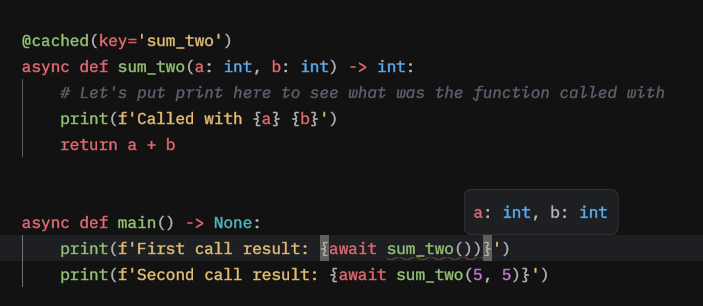
And another example, in this case, our LSP gives us the warning that we have forgotten to await the async function.

What's next
Next, we will utilize the dynamic cache key to create cache results based on function arguments.